
Designated supplier of the world's top 500 smart houses

How to Create Exterior Home Renderings?

Creating Exterior Home Renderings is more than placing a house inside a polished digital scene. It is a practical visual process that connects architectural drawings with the client’s future experience. A successful rendering should show scale, materials, daylight, landscaping, and the relationship between the home and its surroundings. The front path should feel walkable. The window reflections should appear believable. Even a small shadow can affect the entire impression.

Alex Hogrefe, an architectural visualization artist and educator, offers a useful principle: “The image should communicate the design, not compete with it.” This idea matters when choosing camera height, sky conditions, textures, and decorative details. A dramatic sunset may attract attention, but it can also hide poor proportions or unclear construction choices. Clear evidence matters more than visual excitement.

The process usually begins with accurate plans and reference photographs. Designers then build the exterior model, apply realistic materials, set lighting, and test several viewpoints. Brick should show subtle variation. Concrete should not look perfectly clean. Trees need irregular branches, not repeated digital shapes. Small imperfections create credibility.

Still, no rendering is completely objective. A carefully chosen camera can make a narrow entrance appear generous. Bright landscaping can distract from weak architecture. Therefore, review the image with a builder, designer, and client. Ask what feels unclear. Revise it.

Good Exterior Home Renderings do not promise perfection. They reduce uncertainty, reveal design problems, and help people imagine daily life before construction begins.
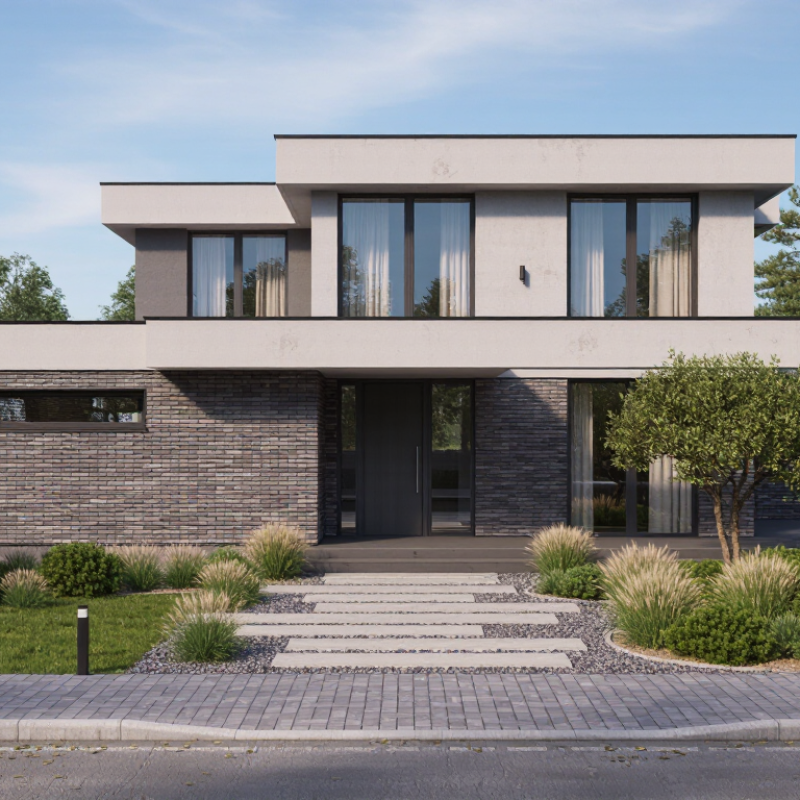
How to Create Exterior Home Renderings?

Define the Rendering Brief with 1:1 Scale, Views, and Required LOD

How to Create Exterior Home Renderings?

Before modeling, define a rendering brief that treats the house as measurable evidence, not decoration. Set every major dimension at a 1:1 scale, including wall height, roof pitch, window size, and site boundaries. Record the source of each measurement and mark uncertain areas clearly. Without this discipline, attractive images can still misrepresent the building. I once underestimated a porch depth by several centimeters. That small error changed the entrance’s visual balance.

Choose views that explain the exterior from practical human positions. An entry view should show the door, path, steps, and nearby lighting. A corner view can reveal wall depth, roof edges, and the relationship between floors. Add a rear or garden view when outdoor circulation matters. Mark camera height, lens range, and orientation in the brief. These details prevent accidental distortion. Too many views waste time.

Specify the required LOD before production begins. LOD defines how much physical detail the model must contain. For early approval, accurate massing, openings, roof forms, and materials may be enough. For construction-focused images, include window frames, drainage details, joints, railings, and realistic ground transitions. Link each view to its required LOD, lighting condition, and material notes. Yet the brief should remain flexible. Design decisions often change after the first rendering. Review the images against site photos and drawings. Perfect briefs do not exist.

Capture Site Dimensions and Verify Key Measurements to ±2 cm

Accurate exterior renderings begin with the ground, not the screen. Capture site dimensions before modeling walls, roofs, paths, and planting. Record façade width, floor-to-ceiling height, window positions, eaves, steps, and finished ground levels. A laser distance meter can provide quick readings, but reflective surfaces and uneven paving may create errors. Take three readings when a dimension controls the whole elevation. Aim for a maximum difference of ±2 cm.

Walk the site slowly. Photograph each corner with a visible scale reference. Mark measurement points on a simple sketch, then compare them with architectural drawings. Check diagonal distances, because a rectangular plan may be slightly skewed. I have seen a two-centimeter error shift an entire window rhythm in the final rendering. It looked acceptable on screen, but failed against the survey notes. That mistake needed correction.

The Royal Institution of Chartered Surveyors emphasizes consistent methods, documented assumptions, and traceable survey information in measured survey guidance. These practices support reliable visualization and reduce avoidable coordination problems. The U.S. National Institute of Standards and Technology estimated that inadequate data interoperability cost the capital facilities industry $15.8 billion annually in its 2004 cost analysis report. While the figure is dated, the lesson remains relevant: disconnected information creates expensive rework. Keep raw readings, site photographs, and revisions together. Do not hide uncertainty. If dense vegetation blocks a wall, label the dimension as provisional and schedule a second check.

Exterior Home Rendering Measurement Verification

Absolute difference between the initial site capture and the verification measurement for key exterior dimensions. Each value is compared with the required accuracy limit of ±2 cm.

Result: All recorded differences remain within the ±2 cm verification threshold, supporting accurate exterior modeling and rendering.

Build the Exterior Model with BIM Data and PBR Material Standards

How to Create Exterior Home Renderings?

Build the Exterior Model with BIM Data and PBR Material Standards

Accurate exterior renderings begin with reliable BIM data, not decorative modeling. Use verified dimensions, wall assemblies, roof pitches, window locations, and site levels. Check the model against architectural drawings before adding visual detail. A small height error can distort the entire facade. I usually inspect corners, eaves, and openings closely because these areas expose weak coordination quickly.

Keep the project coordinates consistent. Sun direction and camera height should match the design context.

PBR materials should follow measurable standards. Set correct albedo values, realistic roughness, and physically suitable normal strength. Use consistent texture scale, especially for brick, timber, concrete, and roof tiles. A brick pattern that is too large makes the house feel miniature.

Avoid excessive reflections on rough surfaces. They often look impressive but reduce credibility. I still revise materials after client reviews; initial assumptions are not always accurate. That is part of the process.

Tips: Compare the rendering with material samples, elevation drawings, and site photographs. Use neutral daylight before testing dramatic skies. Check the facade at eye level and from the street. Keep texture names and BIM object data organized for later revisions. Do not hide coordination problems with lighting. A clear model reveals them.

Set North-Aware Sunlight Using CIE Sky and Solar-Angle Models

How to Create Exterior Home Renderings?

Accurate sunlight begins with true north, not the camera’s default orientation. Set geographic latitude and longitude before placing the house. Then choose the date and local time for the intended scene. Solar altitude controls shadow length. Solar azimuth controls its direction. A north-aware setup reveals whether morning light reaches the façade or misses it entirely.

Use a CIE sky model to describe the atmosphere. CIE 011:2008 defines standard sky luminance distributions for daylight studies. Clear skies create sharp shadows and stronger contrast. Overcast skies produce softer, wider illumination. For credible visuals, test both conditions. The UNEP Global Status Report for Buildings and Construction reported that buildings consumed 34% of global energy in 2022. Daylight accuracy therefore supports design decisions, not only attractive images.

Tips: Check true north against a survey or reliable geographic data. Compare the render with a solar-angle calculator. Use physically based exposure, realistic reflectance, and a calibrated display. I often render three times: morning, solar noon, and late afternoon. Small errors become obvious. A balcony may appear bright, while its interior remains unexpectedly dark. That result deserves investigation, not automatic correction. Weather files can also challenge the image, because a clear-sky model may exaggerate typical conditions. Use measured climate data when evaluating daylight performance.

How to Create Exterior Home Renderings? - Set North-Aware Sunlight Using CIE Sky and Solar-Angle Models

Workflow Stage Data Dimension Reference Value or Formula Technical Basis Rendering Application
1. Establish Orientation North reference True north = 0°; east = 90°; south = 180°; west = 270° Azimuth is measured clockwise from true north Rotate the building or sun system so façade exposure matches the site survey
2. Define Location Latitude and longitude Latitude controls seasonal solar height; longitude supports local solar-time conversion Solar position depends on geographic coordinates and date Enter the project coordinates before selecting sun direction or shadow studies
3. Select Date Solar declination Approximately +23.44° at the June solstice, 0° near the equinoxes, and −23.44° at the December solstice Earth’s axial tilt produces the annual change in solar declination Use the actual visualization date when evaluating overhangs, glazing, and façade shadows
4. Set Solar Time Hour angle H = 15° × (solar time − 12); 15° equals one hour of apparent solar time The sun moves approximately 15° in azimuthal hour angle per hour Convert clock time to solar time before positioning the sun
5. Calculate Solar Height Solar altitude angle sin(α) = sin(φ)sin(δ) + cos(φ)cos(δ)cos(H) α is the angle between the sun and the horizontal plane Use altitude to control shadow length and the amount of direct light on vertical surfaces
6. Calculate Solar Direction Solar azimuth angle At local solar noon, the sun is due south in the Northern Hemisphere and due north in the Southern Hemisphere Solar noon is determined by the sun’s highest daily altitude, not necessarily 12:00 on the clock Aim the direct-light vector toward the correct true-north azimuth
7. Validate a Sample Position Latitude 40° N at equinox, local solar noon Solar altitude ≈ 50°; solar azimuth ≈ 180° At the equinox, declination is approximately 0°, so altitude ≈ 90° − latitude Use this as a basic scene check for a north-aware sun setup
8. Compare Seasonal Angles Latitude 40° N at solar noon June solstice ≈ 73.44° altitude; December solstice ≈ 26.56° altitude Values use declinations of approximately +23.44° and −23.44° Test roof projections and façade shading under both high-sun and low-sun conditions
9. Choose Sky Distribution CIE standard sky type Use a clear-sky distribution for strong directional sunlight or an overcast distribution for diffuse illumination CIE standard skies describe how luminance is distributed across the sky vault Match the sky type to the intended weather condition and visual purpose
10. Define Sky Luminance Zenith-to-horizon brightness gradient Clear skies are generally brighter near the sun and horizon; overcast skies are brightest near the zenith CIE sky models use angular luminance distributions rather than a uniform background Avoid a flat environment light when realistic façade gradients are required
11. Set Ground Reflectance Diffuse ground albedo Typical modeling assumptions: dark asphalt ≈ 0.05–0.15; vegetation ≈ 0.15–0.25; light concrete ≈ 0.40–0.60 Albedo is the fraction of incident radiation reflected by a surface Use ground reflectance to control bounce light under eaves and around lower façades
12. Configure Direct Sunlight Sun disc and shadow softness The sun’s apparent angular diameter is approximately 0.53° A finite solar disc produces physically plausible penumbra rather than an infinitely sharp light source Use a physically sized sun disc and adjust only for artistic presentation when necessary
13. Set Atmospheric Clarity Aerosol or turbidity condition Lower turbidity gives clearer, higher-contrast sunlight; higher turbidity increases haze and warm scattering Atmospheric particles reduce contrast and redistribute direct solar energy Coordinate haze, sun intensity, and sky brightness so they describe the same weather condition
14. Check Façade Exposure Incidence angle Direct irradiance on a plane varies approximately with cos(θ), where θ is the angle between the sun direction and the surface normal Lambert’s cosine law describes projected direct illumination on diffuse surfaces Confirm that south-, east-, west-, and north-facing façades receive the expected relative light
15. Final Quality Control Scene verification checklist Confirm true north, coordinates, date, solar time, altitude, azimuth, sky type, ground albedo, and shadow direction A rendering is geographically consistent only when orientation, solar geometry, and sky distribution agree Render a shadow pass and a clay pass before final materials and color grading
Note: Solar-angle examples assume a level horizon, geographic true north, and local solar time. Clock time must be adjusted for longitude, time-zone offset, and the equation of time when precise shadow placement is required.

Render at 2,000+ Pixels in sRGB IEC 61966-2-1 and Perform QC

Creating convincing exterior home renderings starts with controlled output, not a dramatic sky. I render at 2,000 pixels or higher on the longest edge, using sRGB IEC 61966-2-1. This profile keeps red brick, pale stone, and blue-hour shadows more predictable across common displays. The IEC color standard helps, but it cannot repair poor lighting decisions.

I inspect the image at 100% and at final delivery size. WCAG 2.2 specifies a 4.5:1 contrast ratio for normal text, which helps when checking labels or annotations over bright façades.

The 2024 Web Almanac reports that images contribute about half of typical mobile page weight. Large files can slow portfolio reviews. I export a high-resolution master, then create a compressed copy after checking edge detail, banding, and texture clarity. Keep both.

My QC pass is deliberately physical.

I compare the render with the material board, zoom into roof junctions, and scan every window reflection. I check straight verticals, repeated plants, contact shadows, and the horizon line. One missed seam can weaken a credible elevation.

I sometimes over-polish foliage. It looks attractive, yet less believable. A second reviewer should question scale, color neutrality, and whether the brightest surface steals attention from the entrance.

Record pixel dimensions, color profile, file format, and revision date. Small notes prevent expensive rework.

  • Wechat